

TL;DR The web was built for browsers, we built our browsers for agents. The Browserbase Browser is a real Chromium running in the cloud, wrapped in the infrastructure your agent actually needs to use the web like a human: identity, observability, persistence, and a live debugger. Everything else on the Browserbase platform (Search, Fetch, Functions runtime, Model Gateway, Stagehand) is built around it.
How does an agent actually use the web?
Behind every closed support ticket booked by an agent, every form filled by an AI assistant, every "do my taxes" demo on X, there's the same primitive: a real browser, running somewhere, doing what a person would do.
Most of the work people pay agents to do does not have an API. Logins, dashboards, portals, internal tools, government sites, brokerages, airlines, healthcare. Estimates put it at roughly 15% of the web that's accessible via clean APIs. The other 85% is shaped for humans.
Leading AI companies are shipping browser agents and our mission is to support all companies to take part in the future of agents. Our bet is that the future of work is software working on your behalf. And the only universal interface to that 85% is the same thing you opened to read this post (the browser).
"Anything you can do in a browser, your agent can too."
Our Browser is what makes it true at production scale.
What is a Browserbase Browser?
A Browserbase Browser is a real Chromium browser running in the cloud, created on demand via API, controllable via browser agents and AI programs through APIs (Playwright, Puppeteer, Selenium, Stagehand), and wrapped in the infrastructure that turns "a browser somewhere" into "a browser an agent can rely on."
Browserbase is more than a headless library you import or hosted Playwright. We provide a fully managed browser session: an isolated Chromium instance with its own user data directory, fingerprint, network identity, and lifecycle, ready to be driven by your agent in <2 seconds and torn down when the work is done.
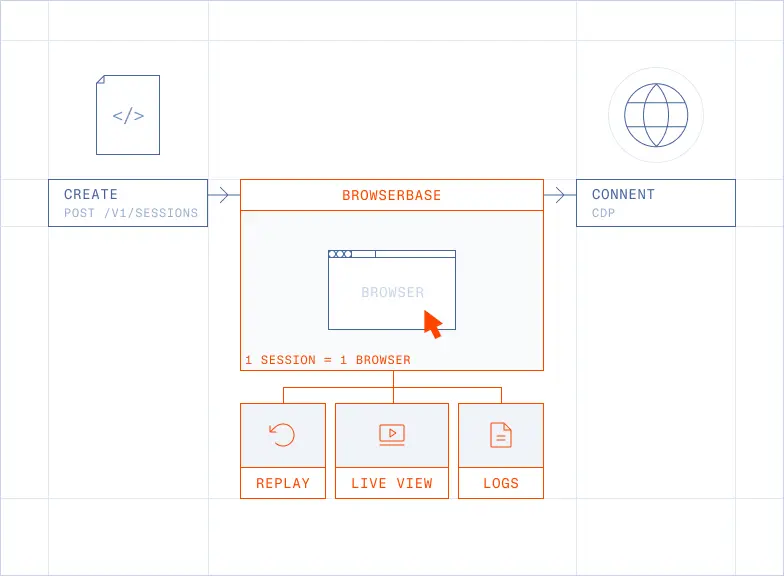
The atomic unit is the session. One session is one browser. You create it through the Sessions API, connect to it over CDP, drive it like any other Chromium, and (importantly) get back a replay, a live view, and a structured log trace of everything that happened.
Here’s the same thing in Stagehand:
A few lines of config, one connect, and your agent is on the open web from a real browser it doesn't have to babysit.
How it works
The session is the unit
Every bb.sessions.create() call boots a fresh Chromium in one of our regions. That browser comes with:
- A default browser context with a preconfigured fingerprint and identity profile, so you don't have to assemble user agents, viewport sizes, and WebGL hashes by hand. Most customers should never touch the fingerprint API; the default is the path of least detection.
- A CDP endpoint (
session.connectUrl) you connect to with Playwright, Puppeteer, or Selenium. Anything that speaks Chrome DevTools Protocol speaks Browserbase. - A session ID that tags every log, network event, console message, screencast frame, and replay artifact for the lifetime of that browser.
Sessions idle out, sessions get torn down on browser.close(), and nothing persists between them unless you opt in (more on that in Contexts).
What's actually inside
A Browserbase session is more than "Chrome in a container." The full pipeline you get for free on every session create:
API gateway:
Fastify REST API at api.browserbase.com, the entry point for every session create / list / debug call.
Connect service:
WebSocket bridge that proxies your CDP traffic into the right browser pod, anywhere in the fleet.
Browser service:
Manages Chromium lifecycle: spin up, recycle, crash recovery, memory management.
Identity layer:
Fingerprint config, residential and datacenter proxy chains, verified, CAPTCHA solving.
Storage:
S3 for replays, contexts, uploads, and extension bundles.
Observability:
Live view (real-time iframe of the running browser), session replay (full video + DOM), structured logs (network, console, CDP).
Your agent talks CDP to a single URL; the platform routes that traffic to the right browser pod, in the right region, behind the right proxy, with the right fingerprint, without you ever knowing which VM it landed on.
Verified Identity, a unique approach to agent web browsing
The failure mode for self-hosted Playwright in 2026 is not "Chrome doesn't work." It's "Chrome works perfectly, but gets blocked in 800ms."
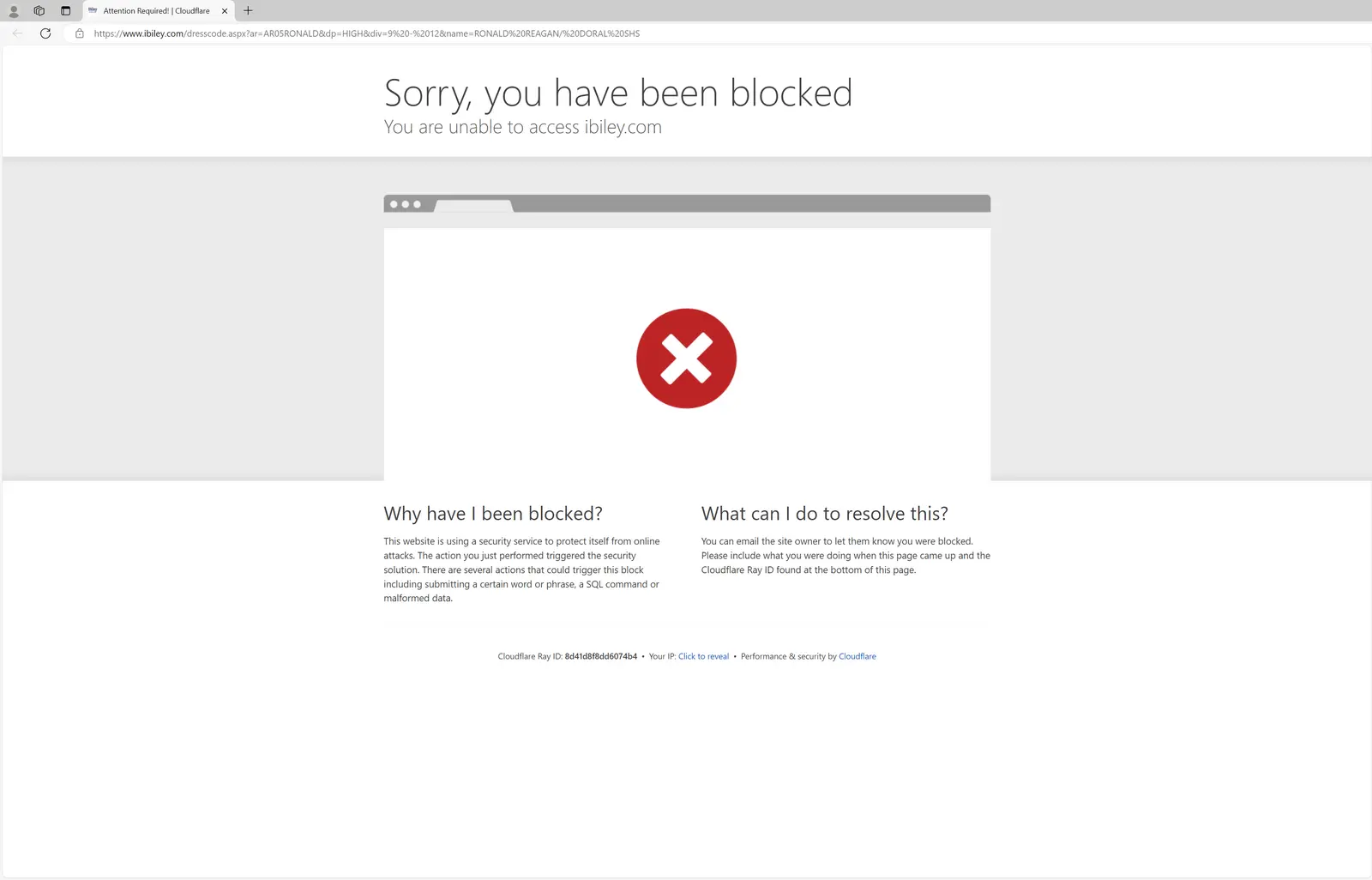
A Browserbase Browser ships with defaults that pass the bot checks most agents fail:
- Verified for sites with serious anti-bot (Akamai, Cloudflare, PerimeterX). One flag:
browserSettings: { verified: true }. - Managed proxies with built-in rotation, geo-targeting (US / EU / APAC), and residential routing. Bring your own external proxy with
type: "external"if you have a compliance reason to. - Agent Identity for the future: pioneering Web Bot Auth with Cloudflare so agents can show up on the web with a verifiable signed identity instead of pretending to be a human.
Most teams building browser agents spend their first month rediscovering the identity stack. You should not be in the fingerprinting business. You should be in the agent business.
Login Persistence with Contexts
By default each session is fresh: clean cookies, clean storage, clean everything. That's correct for most extractions and wrong for most agents.
Our Contexts give you a reusable user-data-directory that survives across sessions. Log in once, save the context, attach it to every future session. Now your agent has "memory" of who it is on a given site without re-authenticating on every run.
This is what makes long-running, authenticated workflows (ie. Ramp's procurement agent, an agent that lives in your inbox, a brokerage automation) actually viable.
Observability is the product
Surprisingly enough, the most-loved feature of Browserbase isn’t the browser itself. It’s how you watch it work.
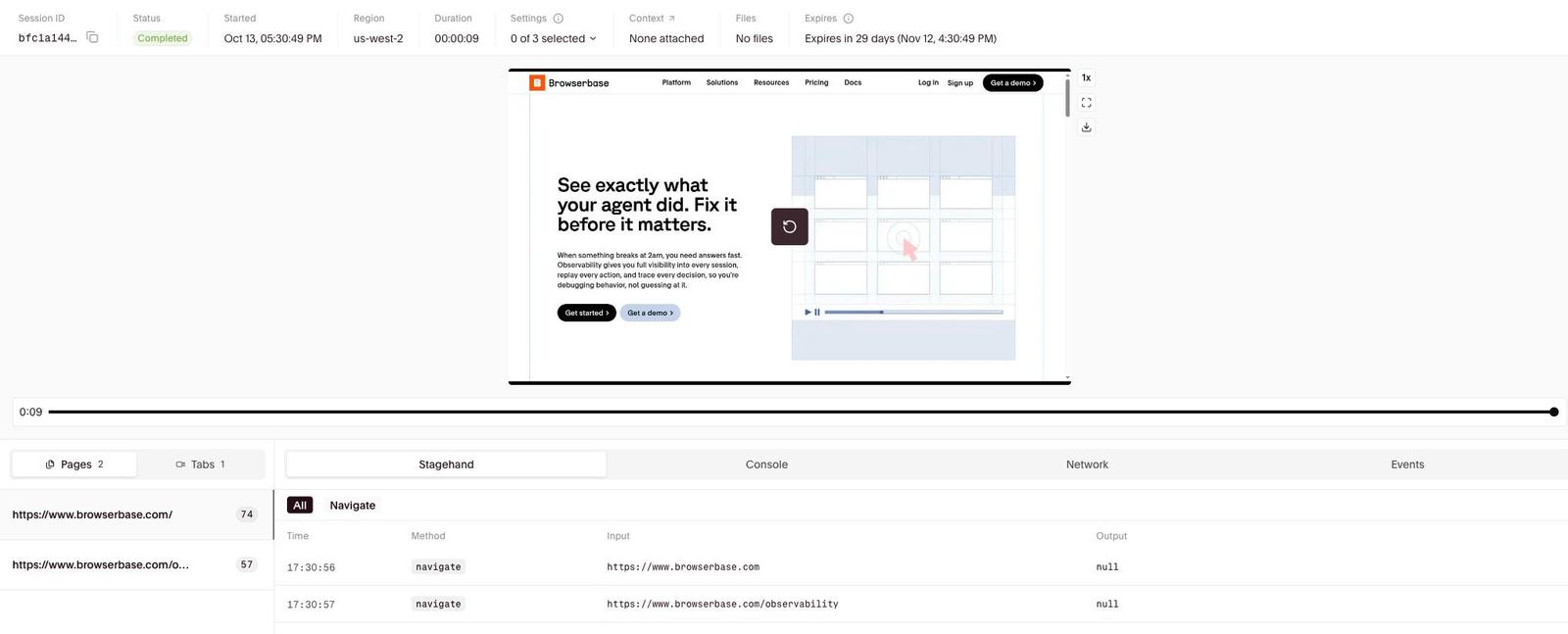
Live View is a real-time iframe of the running browser. You can embed it in your own app, hand it to a user when an agent gets stuck, and let a human take over a single step (a 2FA prompt, a CAPTCHA, a final confirmation) without the agent losing its place. Ramp shipped their procurement agent on top of this exact pattern: when the agent hits a wall, it hands the live URL to the user, the user clicks one button, the agent picks back up.
Session Recordings are saved in the dashboard to help debug and Session Replays lets you stream mp4s of the full session replay in your app. A scrubable, inspectable replay with network logs, console logs, and CDP events captured automatically.
Structured logs for everything: network, console, CDP, lifecycle. If a session failed, the answer is in the inspector.
What it's good at
A Browserbase Browser shines when the work requires real authentication state: login walls, session cookies, and multi-step flows where the agent needs to stay signed in. It's equally at home on sites with serious anti-bot defenses that would block vanilla Playwright in under a second.
Scale is built in. Customers run 6,000+ concurrent sessions on us today, and we handle tens of millions of browser sessions every month across the platform. Whether you need ten browsers or ten thousand, the API doesn't change.
When your agent gets stuck (a 2FA prompt, an unexpected modal, a confirmation step that needs human judgment) Live View gives you a human-in-the-loop escape hatch without killing the session. And when something does fail, you're not staring at a stack trace. Every Browserbase session comes with a full video replay, DOM snapshots, network logs, and a clickable timeline so you can see exactly what happened.
If you're running across multiple regions, one API handles it. No fleet management, no region-specific configs, no infrastructure to maintain.
Tradeoffs
It would be easy to oversell this. A Browserbase Browser is the right tool for one specific shape of problem and the wrong tool for others.
Use Fetch, not a browser, when you just need bytes. If the page is mostly static HTML and you can get what you need from a single GET, bb.fetchAPI.create returns clean markdown through the same proxy network at a fraction of the cost and latency. We see this constantly in Autobrowse runs: a task that looks like it needs a browser is sometimes one fetch in disguise.
Use Search, not a browser, when you need answers about where to go. Search is the token-efficient first hop. The browser is the second
A common workflow we see is: Search → Fetch → Browser. Lead with the cheapest primitive that can answer the question. Browsers are the most powerful tool on the platform and also the most expensive per minute. Use them when the work actually needs them.
Why this changes workflows
The shift from "my team runs Playwright on a Mac Mini" to "my agent runs on Browserbase" is the same shift Vercel created for Next.js apps and Stripe created for payments. You stop owning infrastructure that wasn't your business in the first place.
What you stop owning, concretely:
- Browser binary management. No Chromium upgrades, no "why did Playwright break this morning," no Linux dependencies.
- Session lifecycle. No memory leaks, no zombie processes, no pool exhaustion at 3am.
- Anti-bot. No fingerprint research, no proxy procurement, no CAPTCHA-solver vendor evaluations.
- Observability. No homegrown screen recorder, no log shipping, no "can you DM me a screenshot of what failed."
- Concurrency. No "running 10 browsers locally gets painful fast."
What you start owning, is the agent itself. The prompt. The skill. The product.
That's the best way to do it. The browser is the boring infrastructure underneath every agent that does real work on the web. We want to be the best at it, so you don't have to think about it.
So?
Most people still think about browsers the way they thought about servers in 2008. Something you provision, something you patch, something that lives in a rack (or a Mac Mini under your desk). The only winners in 2008 were the ones who stopped thinking about the rack at all.
The browser is having that moment now. Round one was "a browser for humans." Round two is "a browser for agents." The shape of round two is real Chromium, in the cloud, on demand, with identity and observability built in. Search and Fetch and Functions and Stagehand all sit around it.
The browser is the gravity well.
In five years, every agent doing real work on the web will need a managed browser service. Not because building your own is impossible, but because you'd never build your own database, your own CDN, or your own payment processor either. The browser is next.
The future of work is software working on your behalf. The browser is the universal interface to that work. We're going to give your agent the best one.
Start building with Browserbase
Run headless browsers for your agents and automations at scale. Get started free in minutes.