




TL;DR We are launching Stagehand v4, which moves the guts of the framework (target management, state, and CDP dispatch) into a browser extension that runs next to the page. Remote browsers now behave like the Chrome on your laptop, and the same architecture gives you TypeScript, Python, and Go SDKs at feature parity.
Every automation framework keeps a copy of the browser
Playwright and Selenium set the model that every automation developer now expects. You get a page, context, and handle that points at an element you can see on screen. Those objects are what make browser automation pleasant to write, and they're also, fundamentally, a mirror of state that lives somewhere else.
The browser is the only real source of truth. Every framework that hands you a page object is betting that it can keep a local copy accurate and fast enough to be worth the usability. The bet is usually good enough. When it isn’t, your script acts on a page that has already moved on, and you get an error describing a browser that no longer exists.
When you run automation frameworks against local Chrome, the mirror sits a few microseconds from the browser, so you rarely notice the discrepancy. Point that same script at a remote browser over a CDP URL and the mirror is now physically far from the state it's mirroring, often in another region entirely. The gap widens, and it surfaces as errors that read like nonsense.
Target page, context or browser has been closed is the classic one. Your agent calls page.click, the page navigates or closes in the same window, and the click arrives at a target that doesn’t exist anymore. The client had already decided the page was there, but by the time it found out otherwise, the request was already in motion.
None of this is unique to remote browsers, and it isn't unique to us. Any framework managing its own state has some version of it. Remote execution is what turns a rare race into a recurring hurdle.
The production bug
Here's a concrete one from building Stagehand v3.
Stagehand enforces domain policy through the CDP Fetch domain. You call Fetch.enable, requests pause before they leave the browser, and each one is allowed or blocked against your
policy. For targets Stagehand creates itself through Target.createTarget, interception is
armed before there's anything to intercept
The gap is targets that the page creates. A click triggers window.open, and with the interception logic living on your machine, the new target starts loading before Fetch.enable can reach it. The pop-up leaks through before policy is applied. The only solution left is closing the target after the fact, so a tab that shouldn't have opened opens and then disappears.
In v4, target management lives in the extension. You set your domain policy and the enforcement runs inside the browser, so a blocked pop-up gets blocked and shows a blocked page. We removed the workaround.
What v4 changes
We moved state management into the browser. In other words, target management, frame and execution context tracking, and CDP dispatch all live in an extension that starts with the browser and dies with it.
Once the logic is in there, a round trip to fetch state costs nearly nothing, so the SDK can ask the browser directly what's true on every request instead of maintaining an in-memory model of every frame and page and hoping it's current. You can always query state, and you can always validate it, because it's coming from the only place that knows.
Lifecycle is also simpler now, because there's no separate session concept for the extension to track. Stagehand runtime is only alive while the browser is alive, and when the browser closes, Stagehand closes with it.
v4 doesn't eliminate every pocket of client-side state. v3 had state scattered across several places, v4 consolidates most of it, and treating the browser as the source of truth for all of it is the direction we're still moving. What we've fixed is the part remote execution made worse.
One shared core, three SDKs
Most of Stagehand's code is state management (target handling, frame tracking, CDP dispatch, the plumbing around model calls). When that lives in the SDK, you rewrite it for each language.
By putting it in the extension, each SDK becomes a thin client over one RPC boundary. We ship a feature to the core implementation once and every language has it immediately, which is what made launching TypeScript, Python, and Go together possible and what keeps them at parity afterward.
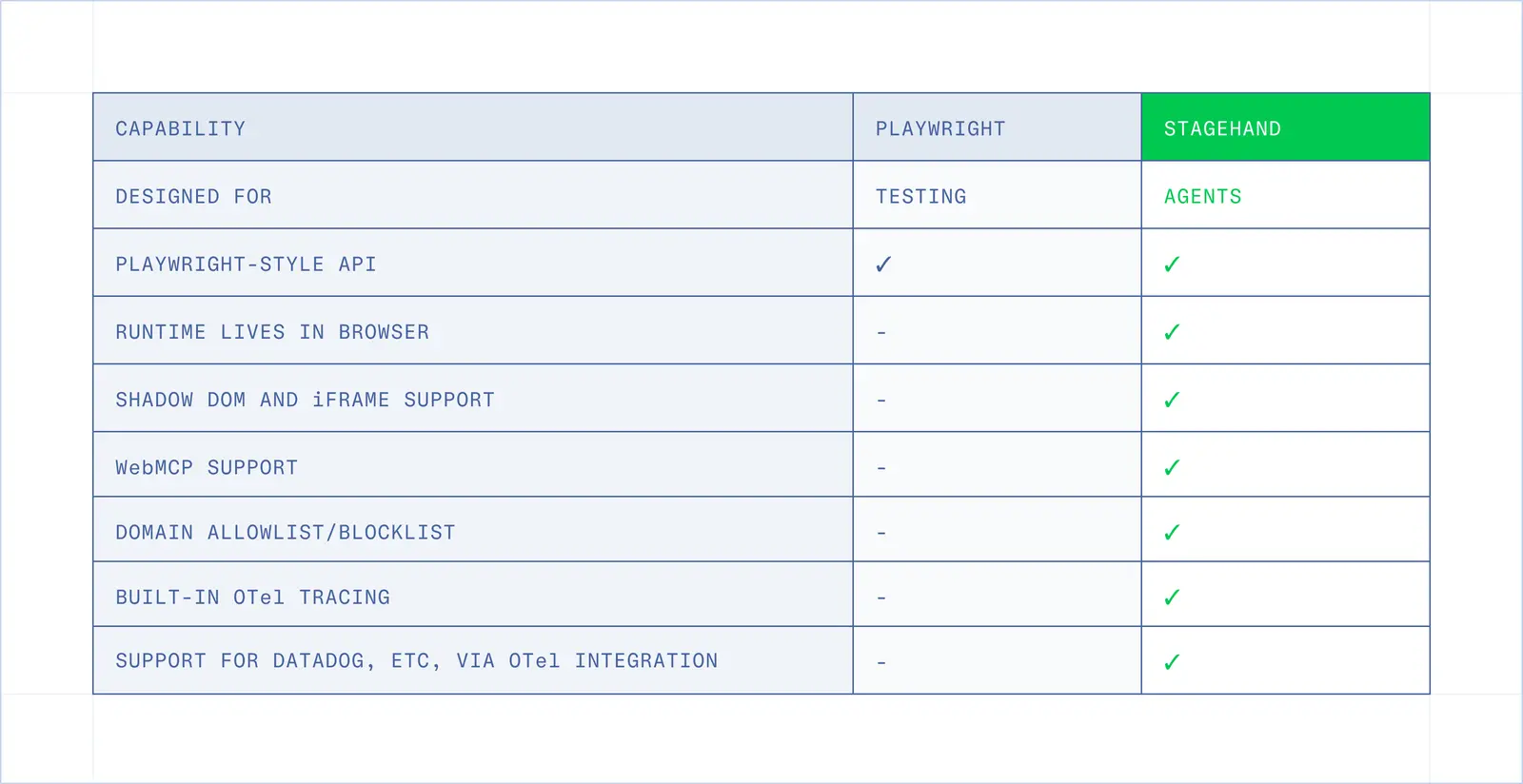
What's new
We kept the v4 interface close to v3 on purpose.
- The SDK and browser lifecycles are separate → v3 started with
new Stagehand(...). In v4 you launch or connect a browser first, throughlocalBrowserorbrowserbase, then callStagehand.create({ browser }). - Context and page getters are async →
await Pages(),activePage(), andurl()now return promises, because they're reads against the browser rather than lookups in a local model. serverCacheis nowcache→ thresholds are configurable, and there's no client-side caching in v4.- Every call returns detailed metadata → usage, cache status, miss reason, the threshold and count that produced the decision, and tokens saved.
- Custom models implement
model: { generate(params) }→ one method to satisfy, and it extends to providers we haven't seen. - One
Locator→agent(),deepLocator(),frameLocator(), and theselectorconcept are gone. One centralizedLocatorreplaces all of them.
What got better
- Out-of-process and nested iframes → cross-origin frames and frames inside frames are
addressable the same way top-level content is. - Shadow DOM → including closed roots, without selector workarounds.
- Copy and paste → real clipboard interaction for flows that depend on it.
- WebMCP → pages that expose tools to agents can be driven through them.
- Domain policy → the policy layer shipped in v3. Where it runs changed in v4, so a pop-up the page opens is now blocked in the browser rather than closed after the fact.
The accessibility tree gets pruned properly
Context bloat is a common complaint about the Playwright MCP. A page serialized naively produces thousands of nodes the model has no use for, and the model pays for all of them in latency and attention.
v4 prunes more extensively, so the models only get what they need to act. The pruning runs in the extension against the live tree rather than on a serialized copy after it crosses the network, which is why it can be more aggressive without risking a stale view of the page.
The SDKs also carry fewer external dependencies, since most of what they used to do themselves now happens on the other side of the RPC boundary.
We’re experimenting with batch commands
Because the extension is next to the browser, a sequence of commands can execute there instead of paying client-to-browser latency on each one.
We measured one 50-action Wikipedia crawl. Batch finished in 14,221.7ms against Playwright's 22,650.3ms, and both completed 50 of 50 actions. That works out to 3.52 actions per second versus 2.21, a 1.59x difference, with 44.0ms of overhead for the outer batch call.
Treat that as one run rather than a benchmark. We're reporting what we measured, on one route, from one client. The per-action medians are the more durable part, because they show where the time went.
waitForSelectorwent from 493.2ms to 237.6msclickfrom 628.1ms to 323.1msgoBackfrom 139.5ms to 17.5ms
Raw CDP is fast, and it cuts both ways
Executing arbitrary JavaScript and CDP commands inside the browser is the reason v4 is quick. It's also why we spent time on guardrails before shipping it.
An agent reading a page is also potentially an agent reading attacker-controlled text. Prompt injection turns into exfiltration the moment injected instructions can reach the network, and a framework that dispatches raw commands from inside the browser is a good place to do that from. So we went down a layer.
Domain policy is enforced at the request level in the browser. A blocked destination is blocked before the request leaves, rather than filtered once the response is already back.
Playwright was built for testing, and it shows here. A test runner has no reason to care whether the page can talk the automation layer into exfiltrating something, so the security model downstream of it was never designed for adversarial pages.
How it works
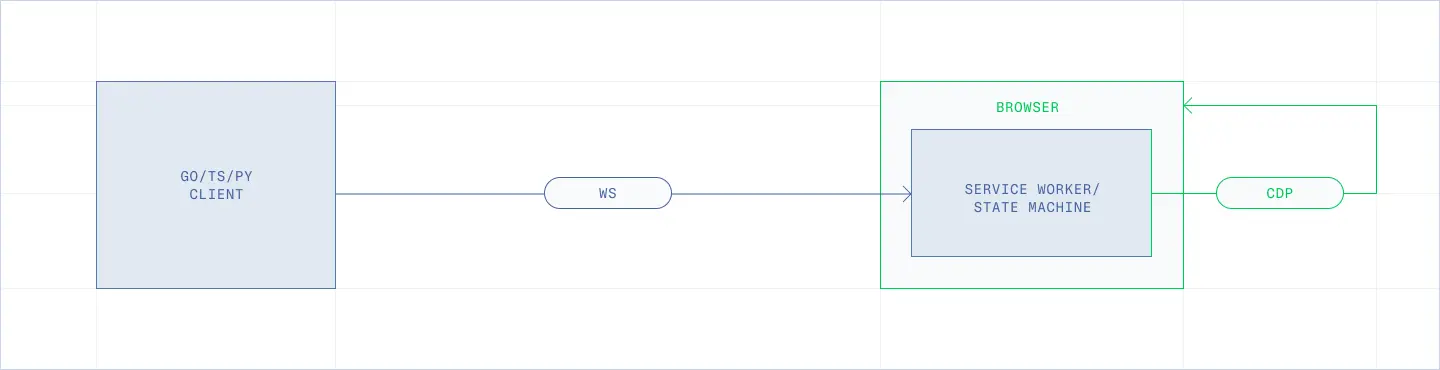
There are two WebSockets. The important part is where each one lives.
Your SDK holds one connection to a service worker running inside the browser. The worker holds the state management, and when it needs to drive the page, it opens its own CDP connection back into the browser it's already running in. A click expands into a handful of CDP calls. In v4 they all run inside the browser. In v3 they crossed the network to get there. Same protocol, different geography.
The extra local hops cost something. In the benchmark above, the client-to-remote round trip measured 42.2ms, so a command that no longer makes that trip can absorb a lot of local overhead and still come out ahead. It's why goBack fell from 139.5ms to 17.5ms.
The win scales with distance. Point this at a browser on your own laptop and there's less to gain, because the round trip you'd be saving was fast to begin with.
How the SDK talks to the extension
The SDK and the service worker send each other plain JSON messages, one request and one response at a time, in the same format MCP uses. Those messages travel inside the CDP connection you already have.
A remote browser gives you opening, the CDP socket, and no HTTP endpoint on the side to call instead. Our other option was opening a second connection, so this means opening another port to expose, another set of credentials to manage, and another thing that can sneakily die while the browser is still running. The CDP socket is already open and already authenticated, for local and remote browsers alike, so we send our own traffic down it.
We didn't add a protocol domain of our own. Stagehand messages route through Runtime, which runs code and hands back results in CDP. It communicates directly to the service worker, and it can push in both directions, so the SDK never has to wait and poll for an answer.
Setup takes two calls. Stagehand attaches to the extension's service worker (Target.attachToTarget), then installs a function inside it named __stagehandSendToHost (Runtime.addBinding). That function is the worker's line back to your process. After that:
- Going in → the SDK runs a line of JavaScript in the worker (
Runtime.evaluate) that hands over the message. - Coming out → the worker calls
__stagehandSendToHost, and the message arrives at the SDK as aRuntime.bindingCalledevent.
Traffic is both ways because sometimes the browser needs something from you. If you brought your own model, generate() lives in your process, so when the worker wants a completion it sends that request back up the same pipe and waits for you. Logs from the worker come back the same way, streaming as they happen. The traces are configured and exported separately.
Attaching another tool to the same browser
Other clients can share the browser. Each CDP connection gets its own session and its own message numbering, so a Playwright or Puppeteer client attached alongside Stagehand can't read or scramble Stagehand's messages.
What they can still do is step on each other inside the browser. Two clients that navigate or close the same page, set cookies, or intercept requests, are both writing to the same state, and nothing in CDP monitors that. We’re working on adding functionality to drive both from a single script.
Getting the extension into the browser
Every Browserbase browser ships with Stagehand already installed, and the extension loads onto a vanilla Chromium session at boot. When the browser is local, Stagehand loads the extension itself through Extensions.loadUnpacked.
What’s next
Moving the core into the browser is what made WebMCP and real clipboard interaction possible, and that same position in the stack is where the next set of features comes from.
- We’re working on a raw CDP escape hatch for the cases where you want to send the command yourself.
- Bringing a Playwright or Puppeteer
Pageinto a Stagehand script and drive both. - Adding more of the security model in the browser, so enforcement that runs next to the page applies whether the browser is remote or on your laptop.
Get started
The Stagehand docs walk through install, connect, and your first automation. If you're on v3, the migration is quick, and most scripts move over unchanged.