

TL;DR: A web agent needs more than a browser. At scale it needs warm pools, isolation, an identity sites accept, observability, and a model gateway behind every decision. Each layer can be built, but together they're a standing system a team of senior engineers must own. This post breaks down all five layers and how to know when building it yourself is worth it.
Build vs. buy: How to build agent infrastructure yourself
Every agent that does real work on the web needs hands to do it, and those hands are a browser. Not an HTTP client that fetches markup, but a real browser that runs the page's JavaScript, holds a session across navigations, renders the DOM the model reasons over, and gets through the login wall. The model decides what to do, but the browser is what actually renders the page.
Hands are only the start though. Often overlooked, but we actually bring a lot more to our desks when we open up our laptops than we think. To work the open web the way a human does, an agent needs the rest of a human’s faculties, too. It needs a passport that sites recognize and wave through, eyes on what happened when a run goes wrong, and the judgment or reasoning behind each click. Still, agents don’t have our biology, so underneath all of that is their own computer-equivalent, which is plumbing that keeps thousands of them running at once without leaking into each other.
Standing up the first browser is easy. Chromium and Playwright are open source and you already run containers, so an agent can be clicking through a flow by the end of the day.
Dare I say a weekend project, until you dream of production.
The one browser you were watching becomes thousands you don’t have more eyes for, and each one has to carry a passport that sites accept, reach pages built to turn it away, recover when a session dies mid-task, and record enough that you can debug the single run in ten thousand that failed. Don't get me wrong, you could build all of it with tools you already know, but it's a great deal more than launching Chromium.
The thing is that none of this is even your agent. The passport, pools, isolation, proxies, observability, and model routing are all a substrate between your agent and the web. So every quarter spent building and maintaining it all is also a quarter not spent on the part of a product that’s uniquely yours.
Let me unravel everything to consider when building infrastructure for agents to use the web like humans do.
Warm pools: pre-booting browsers to kill cold-start latency
An agent puts the browser in the request path, so: the model picks an action → the browser carries it out → page is rendered back. This page is the only view the model has before the loop runs again. The browser's latency is the agent's latency, and cold starts mid-task means a running agent is stalled while something downstream waits on it.
Locally you’d never feel this, because you start Chromium once and it stays up, and if the one session crashes you can restart it by hand. At scale that hand disappears, and small numbers aren’t small anymore. A fleet of thousands of browsers with nobody watching any singular session, so a 0.1% crash rate that used to be a rounding error unfortunately becomes a steady stream of incidents across thousands of sessions. The leak I could’ve restarted away on my laptop turns into slow OOM across the fleet.
The cold-start cost sits on top of that. Pulling the image, launching Chromium, and waiting for it to accept commands takes seconds, and these seconds are dead time when an agent is blocked waiting for a browser to exist. The fix for this is to keep browsers prepped in advance, which is what a warm pool is. The browsers are already booted and idling, waiting for the next request.
Running this well comes down to three things.
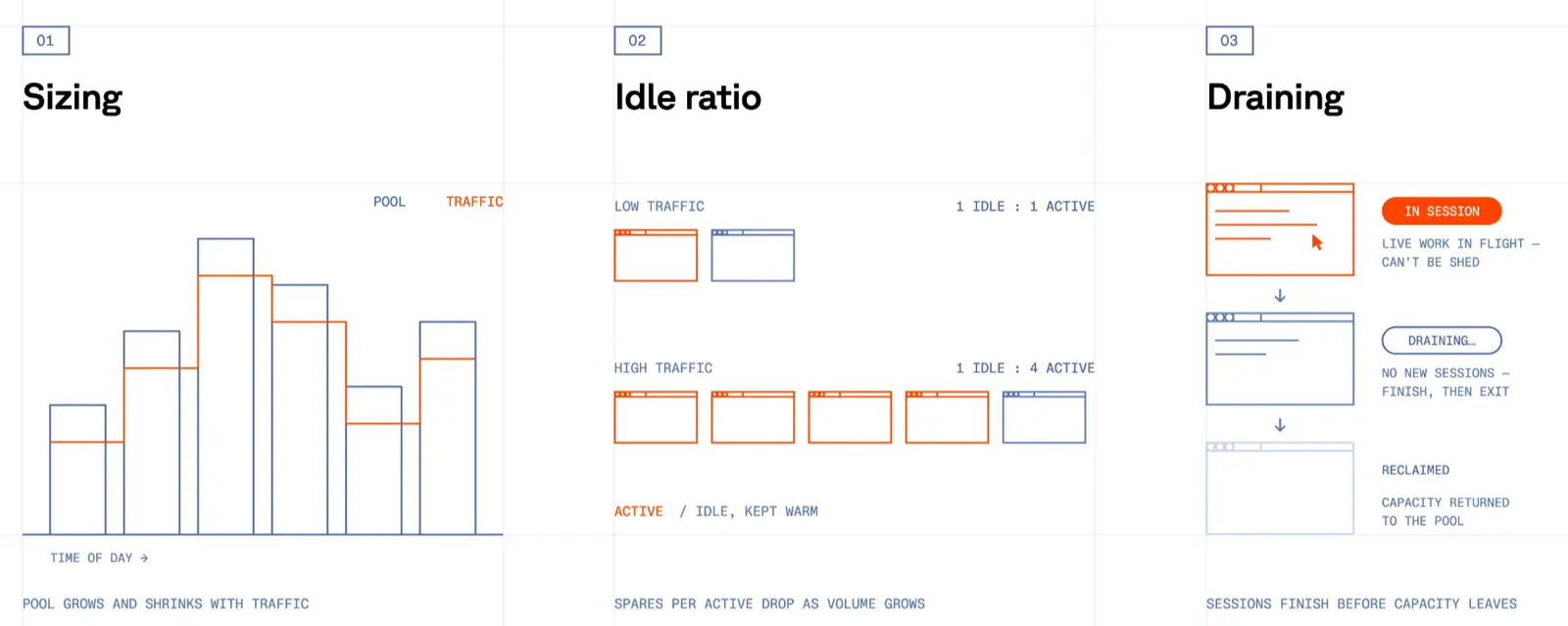
The first is sizing. Too few warm browsers, and requests will queue behind cold starts, which was the latency you were trying to remove in the first place. Too many warm browsers means paying for browsers that sit doing nothing. The right number tracks your traffic, so the pool has to grow and shrink through the day rather than sit fixed.
The second is the idle ratio where the economics live. How many spare browsers you carry per active one depends on how spiky your traffic is, so a product with bursty, unpredictable load has to over-provision for its peaks and might keep one warm browser for every one in use. Spread enough independent traffic across the same pool and then bursts smooth out, so one spare covers several active sessions and the cost per session drops.
The ratio improves as volume climbs high.
The third piece is draining. Sessions are stateful and long-lived, so you can't shed capacity the instant that load drops in the way you would with stateless workers. Killing one mid-session kills live work. Scaling down means waiting for sessions to finish before you can reclaim their capacity, and running a deploy that cycles the fleet to drain and refill in stages.
All three move with your traffic, so none of it can just be set and forgotten. It’s iterative, which means the pool you tuned for today is mistuned the moment usage shifts.
This is the first layer. It’s really just ordinary autoscaling made harder by state, and the idle capacity you carry to stay responsive is a cost that never reaches zero.
Isolation: sandboxing untrusted pages across a shared fleet
A browser is the one thing in your sandbox that’s designed to run untrusted code. Everything else executes code you wrote or reviewed, but a browser loads whatever page the agent navigates to and runs whatever JavaScript it serves, inside your own process and on your own computer.
Once again, this doesn’t hurt on your laptop, but it packs a punch once you’re spinning up thousands of browsers, when they’re on pages nobody has vetted and all sharing infrastructure. One compromised browser is a foothold on the host it shares with everyone else's. A malicious page exploits a Chromium bug to break out of the browser process, and on shared infrastructure, that escape reaches the sessions running in parallel.
This happens more often than you think. Chromium ships security fixes constantly, plenty rated high or critical, and some patched only after they were already being exploited in the wild. It’s quite the hurdle to be running the most attacked software on Earth, thousands of copies at a time against input you don't control.
You handle this in two parts.
The first is isolation itself. Every session needs a real boundary, so a page that breaks out of the browser hits a wall instead of the host. No infection! This means one browser per sandbox, ideally per lightweight VM rather than a shared kernel, so a renderer exploit that escapes Chromium still can't reach the machine or the sessions beside it. The naive version, many browsers sharing one container, is the version where one bad page takes down the whole crew.
Our compute layer runs on Firecracker, so our browsers stay isolated at the VM level without paying for a full VM each.
The second part to consider is patching. The CVEs never stop, so neither does the patching. Every release has to be tested and rolled across the fleet quickly, because the window between a fix going public and the exploit being weaponized is short. Public CVEs are a clear recipe for anyone who wants in during that window.
Soon you’ll notice that patching and stealth fight each other. If you've forked Chromium for stealth, every upstream security patch has to be reapplied on top of your fork before it ships, so the harder you lean on custom evasion, the more painful staying current becomes. Security and evasion end up being the same release pipeline fighting over the same binary.
Identity: coherence and residential routing
Every site your agent visits evaluates it and asks two questions: who is this? Where are they coming from? A human clears both without noticing, while an agent has to earn both with a passport. The open web either waves an agent through or turns it away.
Locally, neither question gets asked and nobody's screening you. At scale, both are asked on every request, and a default setup fails them through challenges/CAPTCHAs, rate limits, and outright blocks.
Who the site sees
A browser carries an identity on every visit, which is just the set of signals a site can read about who's connecting, and they span the whole stack. At the network level, the TLS handshake produces a fingerprint (JA3, or the newer JA4) and the HTTP/2 frame ordering forms a signature, both of which differ between real Chrome and most automation stacks. Higher up, a page can read navigator.webdriver, enumerate installed fonts and plugins, and hash a canvas or WebGL draw to see how the graphics stack renders. It can even watch behavior, like mouse paths and the timing between clicks.
Cleaning up the obvious tells is the easy part. Headless Chromium sets navigator.webdriver to true, ships a HeadlessChrome user-agent, exposes no plugins, and renders canvas with no entropy. You can clear each of these directly by forking Chromium and making changes.
The challenging part is coherence. Detection systems read every signal together, so a browser that’s advertising Chrome on Windows while carrying a Linux renderer string, mismatched font metrics, and a timezone that doesn't match its IP geolocation is easier to spot than an untouched headless browser, because no real device produces that combination.

You have to maintain identities where every signal agrees with every other one, from the GPU string to the OS to the fonts to the locale, and when you rotate them to spread traffic, each one has to stay just as consistent.
Then there are CAPTCHAs. Past a certain volume, some sessions get challenged no matter how clean the identity is, so you wire in a solving path, detect which challenge type you're facing, and return the answer back into the page.
Where you connect from
A perfect identity still gives you away if it arrives from the wrong place. The second question points to the IP, and the default answer fails immediately since traffic straight out of your cloud carries a datacenter address. The ranges for every major provider are public, so a lot of sites treat anything from them as automated before the page even loads.
Getting through means routing through residential IPs, which are the kind ordinary people browse from, so the web reads it as normal traffic. One step forward and two steps back, because this now opens a sourcing and reputation problem. Those addresses have to come from somewhere, and the somewhere has to be one you can stand behind. Reputation isn't fixed either as addresses get flagged, whole pools get burned, and a noisy neighbour sharing your pool can degrade it for everyone else.
IP reputation behaves like an asset you maintain rather than one you buy once. It’s another moving piece. You rotate addresses, retire the flagged ones, replace capacity as a pool wears down, and keep checking where the addresses came from in the first place.
Both questions drift on their own schedule. Detection systems update whenever they like, pools decay, and an identity + network setup that worked this month will start collecting blocks next month, unless someone's watching the block rate and keeping both halves current.
Observability: recording sessions and tracing model decisions
The first three layers get an agent onto the page and acting. The next part is seeing that they actually did. You can’t trust an agent that you can’t watch, which is why agent infrastructure needs eyes and logs. We go from black box → a debuggable workflow.
This is already the case locally. The browser is right there, so you can watch it click through the flow, and open devtools when something looks off. It’s free visibility, as long as it’s one session and one screen.
It goes dark at scale. The agents run on a machine you don’t have eyes on, fails at step #40 out of a 67-step task, and you’re presented with an incredibly detailed log line of “click didn’t land.” You can't see the modal that took care of the button or the redirect that fired first. To debug it you need to see what the browser saw, which means recording the session. That gets pretty pricey.
Video versus DOM
There are two ways to record a session, and they fail in opposite directions.
Video encodes the actual pixels as the session runs. It captures everything exactly as it rendered, but encoding thousands of concurrent streams burns CPU on the same hosts running the browsers. So observability competes with the fleet for compute.
DOM reconstruction, on the other hand, records the DOM and its mutations instead, then replays them into a fresh page later, the way rrweb does. It’s much lighter, since you're storing a stream of changes rather than video, but it breaks precisely where the real web gets complicated. Nested iframes, shadow DOM, cross-origin frames, and canvas don't reconstruct cleanly, so the weird sessions on hostile pages (which need the most debugging) are most likely to replay wrong.
You have to pick your failure for your use-case here. Video costs compute and storage but shows the truth, while reconstruction is cheap but sometimes unreliable. Robust setups run both, so video where fidelity is important and then reconstruction everywhere else, which means two recording pipelines instead of one.
Seeing why, not just what
Replaying the browser tells you what happened on the page. For an agent, this isn’t the important part. The agent acted because a model decided to, so when a run goes wrong, the decision should be questioned. Did the model misread the page, get a bad tool result, or perhaps hallucinate a button that wasn't there?
Answering this means tracing every model call and tool call lined up against the session, so you can see the page state that the model was reasoning over when it chose an action. Replay and trace have to be placed in one timeline because they each tell half the story separately. One way to approach this is to put session replay, network and event logs, as well as the model and tool traces in one view.
This all has to also be stored and indexed long enough to matter. Full recordings + per-step traces across a fleet are terabytes of data. The log you'll probably want is an old one from the run that broke last week, so that retention is key.
Model gateway: routing, fallback, and caching across model providers
The browser is the hands, but the model is the judgment, and judgment runs on API calls to whatever labs you've wired in. Locally, this is one SDK, one key, one provider, and it works.
Then at scale, one provider isn’t necessarily enough. Different steps call for different models, since the cheap/fast one handles routing and the expensive one handles the hard reasoning. It’s rough being locked to a single model or lab when pricing, limits, or the frontier itself shifts every month.
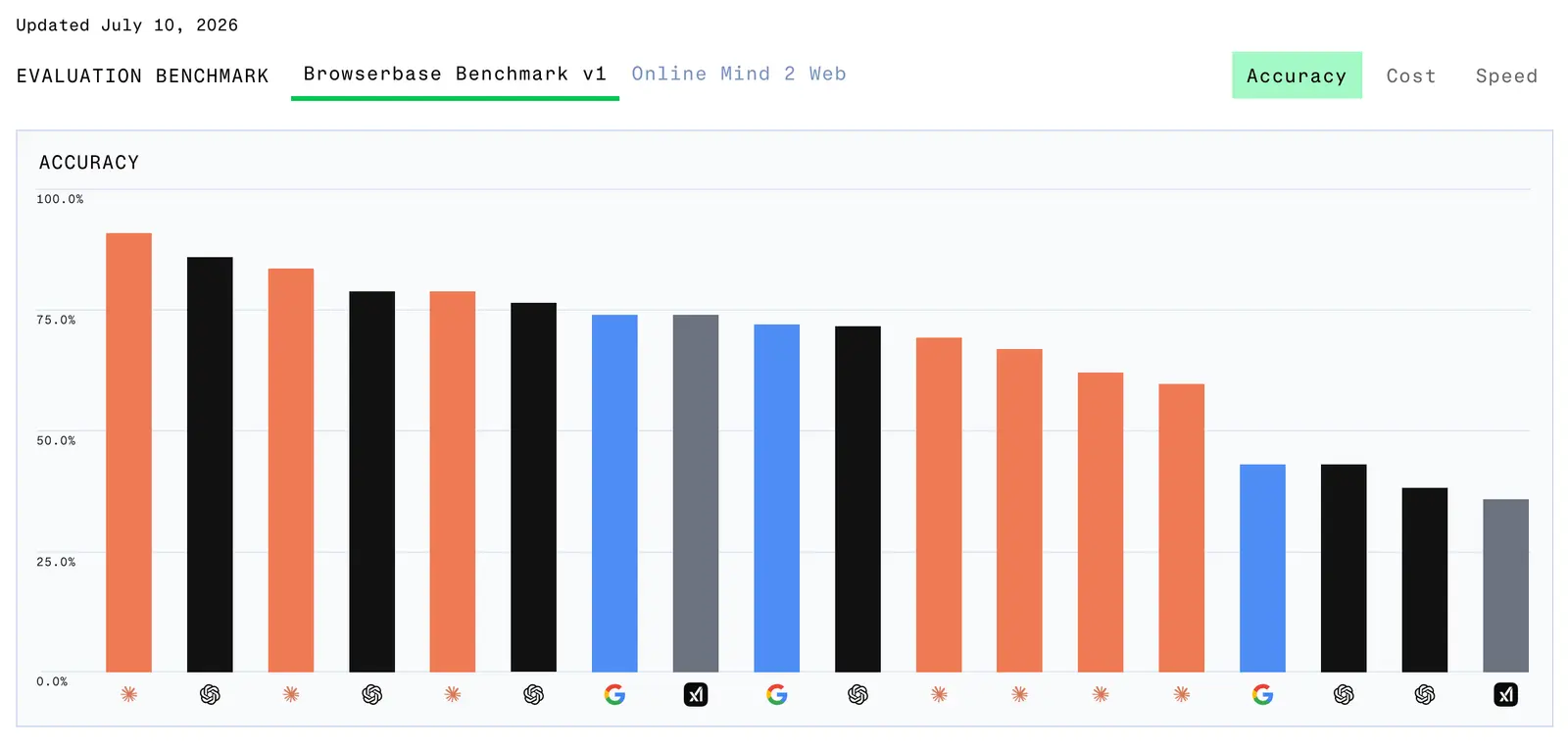
And the moment you're calling more than one, you've signed up to run a gateway between your agent and all of them, no matter whose framework you're using.
Running this comes down to a few things.
The first is routing and keys. Every provider has its own SDK, auth, request shape, and response format. You can wire each provider directly into the agent, but it’s usually better to put a thin wrapper in front so the agent talks to one interface. This way, one internal call routes to whichever lab a given step needs, with the keys and quotas for all of them managed in one place instead of dispersed through the codebase.
This setup stays live even when a provider isn't. Once you hit a rate-limit or a lab degrades, the agents still shouldn’t stall mid-task. Gateway enables retries with backoff, and fallback to another model when the primary won't answer.
We all know costs creep up quickly. Agent runs are chatty, since a single task can be dozens of model calls, and at fleet volume, the token bill gets hefty. The gateway is also where you meter spend per run, and where caching becomes relevant. When a step repeats, the same page parsed the same way across thousands of runs, the gateway can return the action it already resolved instead of calling the model again. That skips the call entirely, cutting both latency and bill. It's great, and it's one more thing to build and maintain.
Agent infrastructure builder turned model plumber!
What building it actually costs
So what does all of this cost to run? The figures below are illustrative - one plausible mid-size fleet, but the shape maps to whatever your real numbers are.
Let’s say you run eight browser containers around the clock to keep capacity ready. At the compute they need, that lands around $0.10 per container-hour, so eight of them running continuously is roughly $5,800 a year in raw infrastructure. This will actually show up on an invoice, and it’s pretty reasonable.
The next part gets muddier with tokens. At fleet volume the model bill racks up fast, and depending on how much you wind back with caching (the repeat steps the gateway can answer without calling a model), it runs into the same range as the compute or well past it. I'll roughly put a few thousand dollars a year at this scale, and more as you grow.
The real cost is that none of this runs itself. For each layer I walked through, the warm pool that has to be resized, the Chromium fork that has to be re-patched against each CVE, the identities that drift, the pools that get flagged, the replay pipeline, and the gateway, is a standing system that someone has to own. Probably a team of senior engineers, which costs somewhere around $220,000 a year each.
Of course, they won't spend all their time here, but it’s still a decent chunk. Even if infrastructure takes 10-20% of an engineering team’s year (which is pretty conservative), that's $22,000 to $44,000 a year in salary for just one engineer spent keeping browsers alive.
Don’t forget about compliance either. If you’re working with healthcare or finance, SOC 2 type II, maybe HIPAA, a pentest, and zero-retention guarantees must also be stood up with each as its own project (audits and upkeep included). BTW, none of that actually makes the agent better. It’s the cost of being allowed to run it for real use cases.
When to build it anyway
Everything so far is a case for how much you would take on when you build this, which doesn’t mean you should never build it. There are real situations where owning the stack is right.
The clearest is when browser infrastructure is literally your product. If you sell stealth, proxies, or a browser platform of your own, the five layers are in fact the thing your team is building.
Past that, the honest reasons to build in-house tend to be strategic rather than technical:
- You have the engineering bandwidth and you want the control. A large team that can afford to own this, and has a deliberate reason to, isn't wrong to.
- You can't depend on outside providers. There are on-prem requirements, a policy against procuring external vendors, or a data boundary that forces everything to run inside your own walls. When the constraint is real, it outweighs every efficiency argument, and you build because you have to.
- You want it on your own hardware. Some teams want browsers on bare metal they own and control end to end.
Most build decisions aren't made for these reasons, though. It’s often because a demo worked on day one, and the real costs appeared later with scale. Even “being early” isn’t a compelling enough reason to build. If you're prototyping by running a few sessions to prove something out, the right move is usually to buy, ship the proof of concept on a provider, and revisit build-versus-buy once you actually know the scope of the problem. Building infrastructure to run a POC means doing some really expensive work before knowing if you even need it.
Where to go from here
That's the whole map with five layers between your agent and the open web, each one buildable, and each one as a standing system once it's live. So build? Or buy?
A few things worth reading next:
- What is a headless browser → the foundation the whole stack sits on, if you want the primitive before the fleet.
- Forking Chromium for AI automation → why suppressing the identity tells means going all the way to the binary.
- The CAPTCHA arms race → a deeper look at the detection side of identity, from distorted text to full browser identity.
- TLS fingerprinting with JA3 and JA4 → how the network layer reads you before a page even loads.
- rrweb → the open-source DOM-reconstruction approach behind the lighter half of session replay.
If you're still weighing it or want more context on any layer, we’d be happy to answer any questions or bounce ideas back and forth.
Start building with Browserbase
Run headless browsers for your agents and automations at scale. Get started free in minutes.