


TL;DR Letting agents write code makes them better at using a browser. When you get out of the way and just let models do what they’re good at (writing code), performance across all domains improves.
Since the inception of Browserbase, our thesis has been centered around AI completing work on your behalf. We’ve seen hundreds of new models and iterations of computer/browser use. We’ve wrote about the history and how Astra works.
On January 23, 2025 OpenAI released Operator, the first popularized computer-use model. It was the first time people realized that a computer might be able to do our jobs for us. They post-trained a vision model to identify pixels on a screen and return tool calls to click, type, and interact with those pixels.
Here was our first open source implementation of it.
It worked … for some tasks. The models definitely got better over time. Anthropic saw major improvements across newer Sonnet & Opus models, and Google Deepmind with Gemini 2.5 pro. We even helped them train and evaluate it.
But they never really stuck well. These models are trained on very specific aspect ratios and viewports (ie. 1280p) and can only identify pixels properly on those exact viewports. Change it at all and the agent essentially goes blind. In testing, browser resizes caused CUA models to fail and sometimes completely miss/misclick buttons on the page.
Since the models are pure vision and coordinate clicks, you can only interact with what you can see. A lot of the modern internet includes components that you (unfortunately) can’t see with just a screenshot, meaning vision-only approaches can only get you halfway there.
Ding! Why don’t we just add vision + text. The agent should be able to see both visually what’s on the page via screenshots, but also what represents that page via snapshots. This worked for a while, we saw improvements on benchmarks like onlinemind2web and webvoyager with this hybrid approach.
But hybrid suffered on longer horizon tasks, quickly filling context windows and not being accurate enough for enterprises to use in production.
Code mode as a primitive
We’d been trying so hard to give agents more ways to perceive the browser, but we should have just gave them a better way to interact with it.
Around the release of Claude 4.5 Sonnet, we realized that models could write code as a way to express their intent better than humans can capture it. We began experimenting with Code Mode, the idea that you can replace potentially clunky tool calls with models writing & executing code to complete a task.
The first iterations of Stagehand used a strict toolset, “Act, Extract, and Observe” which are mostly self explanatory. We designed them with the foresight that models we’re always going to be untrustworthy, so we should design tight guardrails around them to ensure they don’t act up. We even designed a dedicated CUA tool and harness that wrapped existing SOTA computer-use models from OpenAI, Anthropic, and Deepmind that translated the JSON tool-output into browser interactions.
But we were so wrong. The abstractions we thought would help guide the models and unlock their potential ended up becoming hurtful limitations with every new generation of frontier model. Code was the most effective way for them to communicate and in some cases express combinations and strategies that we hadn’t thought of before. Cloudflare and Deep Agents were early to this idea.
We’re also victims of the bitter lesson. For a while, we tried to build specialized tools and create strict tools and harnesses for agents to interact with the web. It turns out that agents want to do more than “Act, Extract, and Observe” but we have to allow them by de-bloating our tools and simplify everything as much as possible. Every new iteration of models has surprised us in capability and we’ve continually reduced the shape of our tools.
It’s important to design agentic systems with security in mind. The difference between a demo and production boils down to enforcing certain boundaries: like domain allowlists, network-level protection, and a sandboxed runtime with policy governance over what the agents can and cannot do. Models have shown sparks of super-intelligence, but we’re definitely not at AGI yet. You wouldn’t put a race car on public roads without extremely good brakes and a roll cage. The more capable the machine, the more important the safety controls.
Given these discoveries, we rebuilt Stagehand, our open source SDK for browser agents, to become the best set of browser use tools for your agent. Rather than try to force our users to use a specific harness, you can just bring your own and give it our tools.
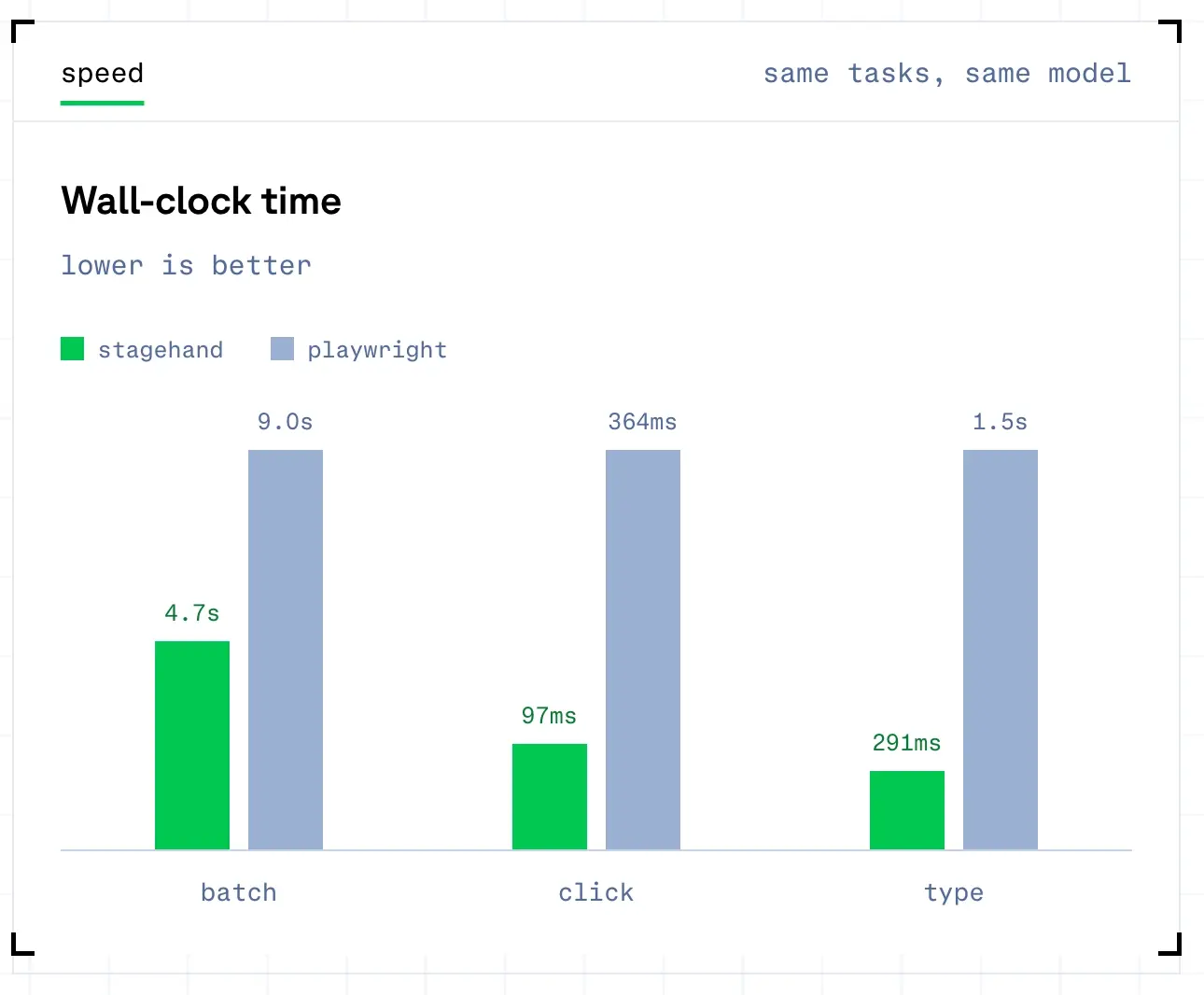
This version of Stagehand is 2x faster and 80% more token efficient than Playwright, the previous leading tool for your agents.
Your agent can use Stagehand
To become properly harness-agnostic we wanted to build a tool surface interface that works with all harnesses.
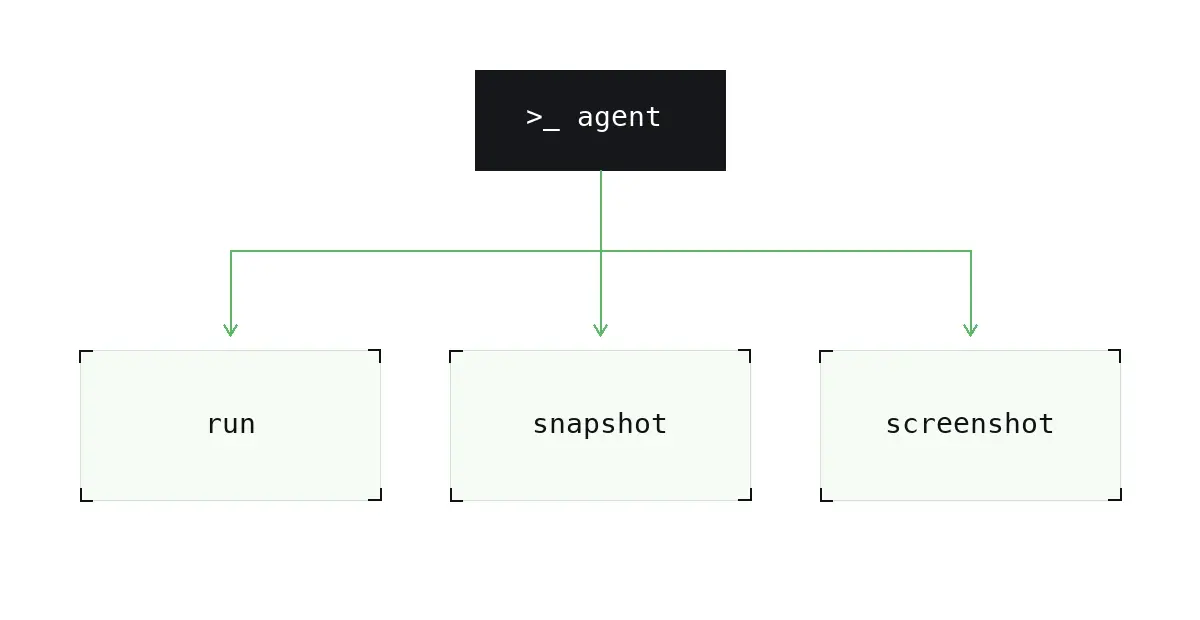
We considered various implementations, but eventually decided MCP was the right interface. We started by building a small MCP server that exposes three tools:
1. `run`: lets you run Stagehand code executed against the browser.
Since Stagehand v4 is an extension (yep a chrome extension), the runtime lives in the browser and you don't need to actually run this code in a sandbox for it to work.
2. `snapshot`, which takes a snapshot of the page
We use a combination of a pruned DOM and accessibility tree to show a succinct representation of the page that gives the agent context exactly what's happening on the page while not bloating its context window. Here’s the code if you want to dive into how we make our snapshots.
3. `screenshot`, a way to give agents visual context of what happens on the page
Since not everything may happen in the DOM representation and there may be visual things that a snapshot might miss, like custom tooltips, canvas based UIs, or anything OS-level.
We plugged this MCP server into our agents and began benchmarking them against older iterations of our agent. Instead of improved performance across the board, the agents were consistently failing because they simply couldn't write proper Stagehand code. The V4 interface was designed to be as close to Playwright as possible but models were still unable to write Stagehand code properly.
All the latest generations of frontier and open models were all post-trained on Playwright syntax and became very good at writing Playwright code. Stagehand was simply not in the weights.
We tried solutions like skills (writing many iterations of a "how to write Stagehand” skill), as well as robust system prompts, and different levels of LLM enforcement and guardrails, but none of them were successful. We even mapped out and considered, post-training an open model to get really good at writing Stagehand code (which ended up not making sense for our customers and users who wanted to bring their own model for the agent harness).
So how did we figure it out? We followed the same pattern that got us here, let the model do what it’s good at and get out of the way.
In order to enforce the models to write and run Stagehand code, we just let the models write Playwright code and created an exhaustive mapping of the slower and clunkier Playwright methods to Stagehand methods which are faster and more token-efficient (here’s how).
Using this mapping the code is “transpiled” on-the-fly into Stagehand before it’s sent to the browser. This translation tool outperforms Playwright on individual methods and batching (multiple commands dispatched at once).
The harness needs to be optimized, too
We spent a lot of time optimizing Stagehand’s tools around patterns we’d seen work in practice, particularly emphasizing letting models write code.
But tools aren’t the only thing you need to work well for an agent: you also need an effective harness.
LangChain has done similar work on their harness, Deep Agents. The Deep Agents harness is built on the primitives that make coding agents so effective, things like automatic context offloading/compaction, delegation to subagents, and planning. But Deep Agents is a general purpose harness (not just a coding harness), so you can bring your own tools and deeply customize it for a given domain.
Deep Agents is also model/provider agnostic, so you’re not locked into a single provider and can upgrade to the latest and greatest models the day they release, or even use open models for cheaper inference. All of this swapping comes with no compatibility concerns.
Coding is all you need
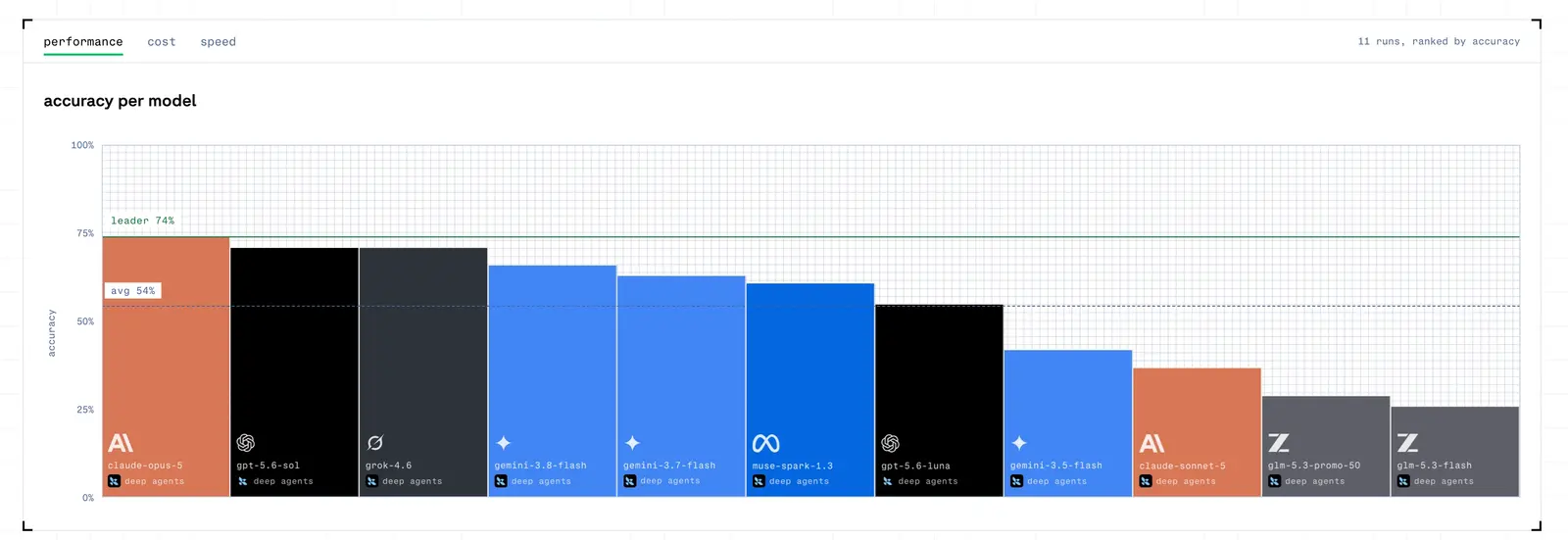
Agents that write code to interact with the browser are the best browser agents. Bring your own harness and give it the best set of tools to give it proper access to the web.
We’ve spent countless hours trying to force agents into shoes they don’t fit. Coordinate clicks, self-repairing harnesses, image + text approaches. Just let the agents do what they’re good at already, let them code. Code mode for browser agents is simultaneously faster, cheaper, and more accurate.
We believe that creating better agents is a harness engineering problem, not a model research problem. In 2026, programming isn’t only useful for creating and building, but now interacting and automating. Now, the best agents are just coding agents in disguise.
Browserbase built Stagehand, the SDK for fast and reliable browser agents. LangChain built Deep Agents, a harness that brings coding-agent primitives to any domain. Both are among the most popular open source agent projects on GitHub, and now we're teaming up to help you build the best browser agents.
Get started with Stagehand and Deep Agents today!
Start building with Browserbase
Run headless browsers for your agents and automations at scale. Get started free in minutes.