
Most production agents run either in or with sandboxes where they can execute code. To enable computer use, it makes sense to run an instance of chromium in the sandbox you’re already paying for. You save money, reduce system complexity, and can now properly allow your agent to use a browser.
I wish this was true. Chrome in a sandbox works in dev, but when you want production to be reliable, you’ll run into issues with compute, security, stealth, identity, and observability.
Let’s zoom out, what does “Chromium in a sandbox” actually mean? Well in that sentence there are actually two sandboxes, your agent’s sandbox and chromium’s sandbox.
The first is usually a container or lightweight VM that safely runs generated code, shell commands, files, and dependencies. The second is a multi-process system that separates browser, renderer, GPU, network, and utility processes. It uses Linux namespaces, seccomp-bpf, and other boundaries to contain pages that execute untrusted JavaScript.
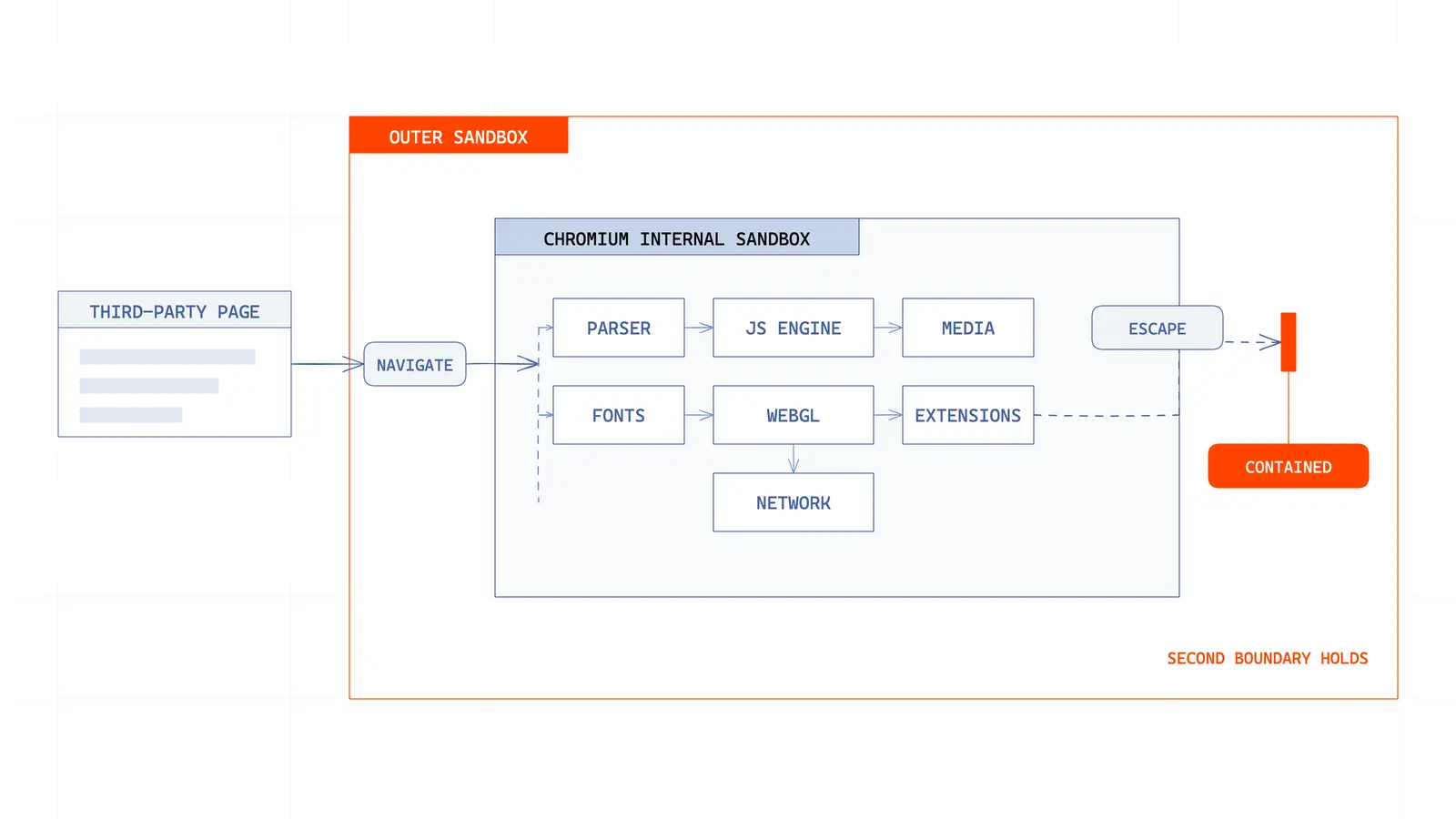
In theory this should work, and it does to an extent. You’ll only start running into problems when the outer sandbox (which was only meant for code execution) has to run Chromium (35M+ LoC and one of the most attacked and resource-hungry applications ever).
Local ≠ Production
Spinning up a programmable local browser can be <10 lines of code:
For an agent testing an application served locally, this experience is hard to beat. Your app, Chromium, and Playwright are all connected, plus a deterministic script can execute without a remote CDP round trip every action. In this case, local Chromium has a latency advantage. Unfortunately, a fast single-browser process on your laptop isn’t equivalent to a production remote browser system.
Compute resources are scarce at scale
Today, Agent sandboxes are built for bursty code execution, meaning a process starts, reads some files, calls a model, writes an artifact, then idles. But Chromium is like a small operating system. Its multi-process model improves reliability and security, but each page can create renderer processes, JS heaps, caches, shared-memory regions, network state, and GPU work.
Your model client, generated code, local app server, and browser now fight for the same CPU budget. A page animation or heavy JS bundle can steal cycles from the agent that is trying to act on it.
You’ll also have to manage memory allocation: pages, extensions, and renderer processes can all leak. The system needs process supervision, hard memory limits, health checks, recycling, draining, and crash recovery. The fleet must also be stateful, killing the process also kills the user’s cookies, open tabs, downloads, and in-flight task, which definitely won’t deliver a delightful product experience. Chromium also heavily uses /dev/shm and pushes shared-memory work onto disk and can create even more perf problems.
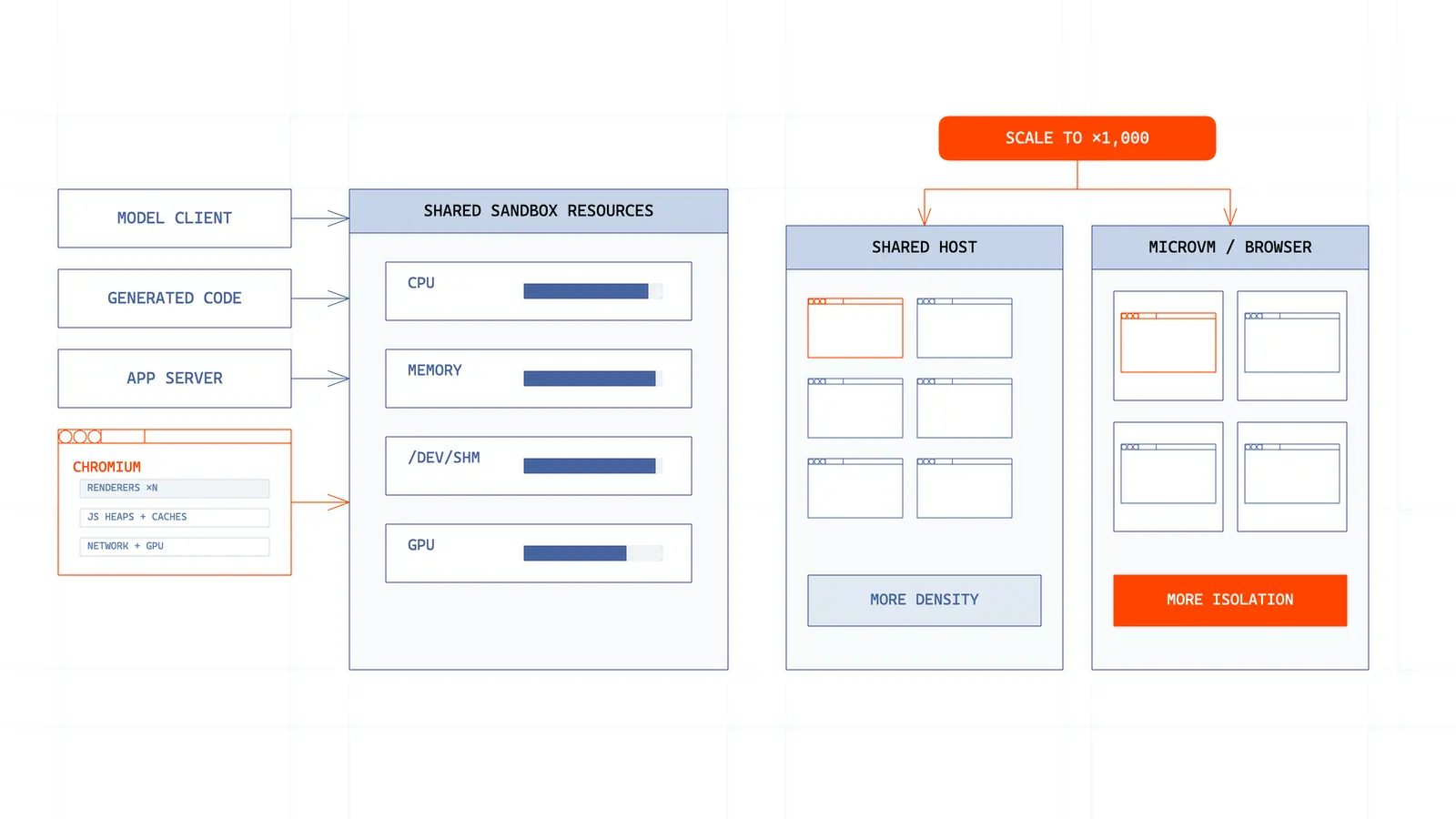
To make the most of your compute you can pack more browsers into one sandbox to improve compute utilization, but this increases noisy-neighbor effects and expands the blast radius of a bad or corrupted browser process.
Alternatively, what if your agent only needs to scale its browser capacity? If the browser is bundled into the agent sandbox, you have to spin up more full sandbox VMs just to run more browsers, consuming far more compute than if the browser layer scaled separately.
Security is an unsolved problem
Unfortunately, the web is full of malicious actors. Luckily the browser is designed to execute potentially hostile input and make sure nothing breaks. Chromium’s internal sandbox has to isolate and defend against these attacks, but the outer sandbox is responsible for containing the browser in the event an escape crosses the first boundary.
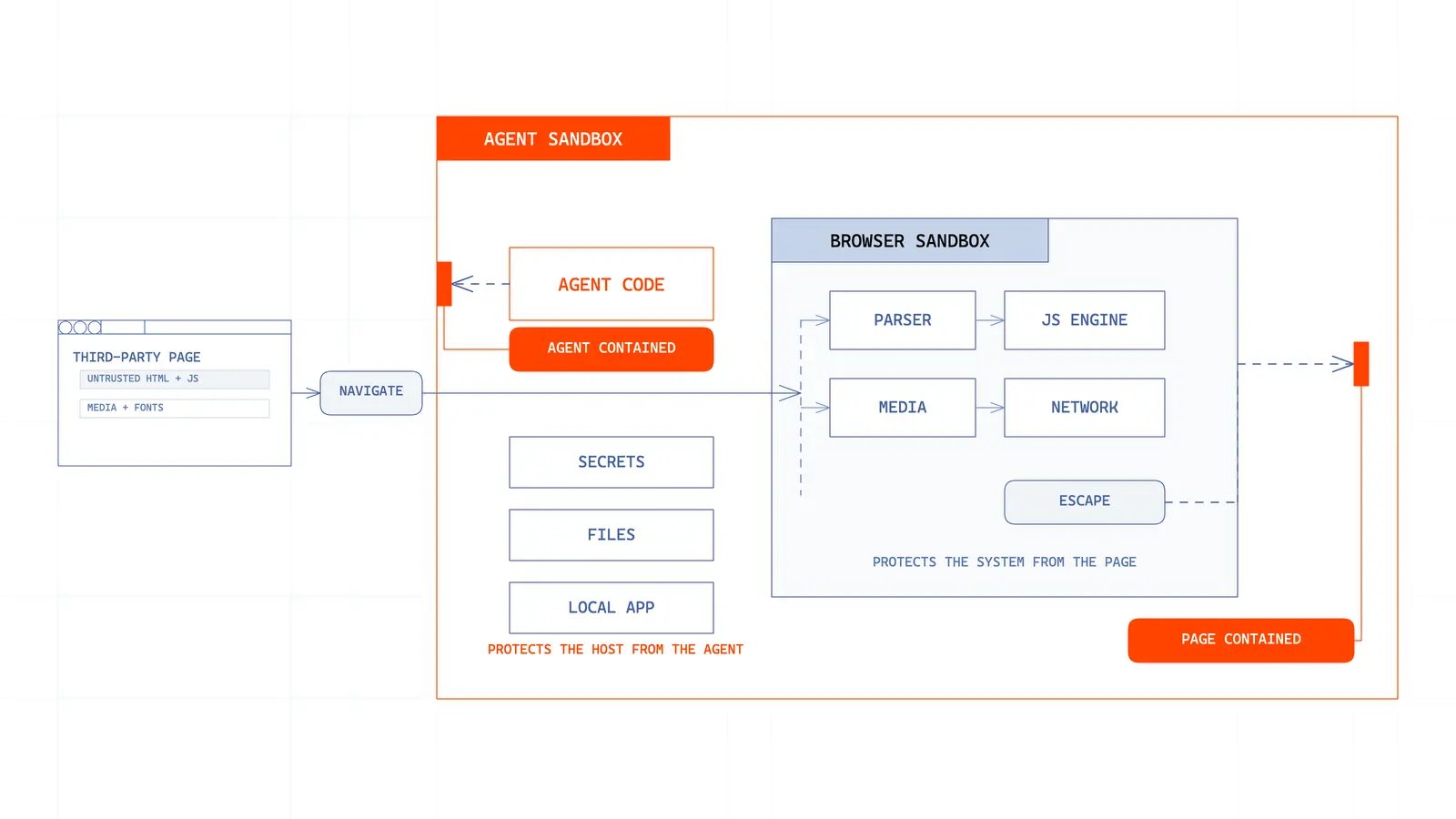
In most workflows the sandbox may contain model credentials, application secrets, source code, customer files, or an internal preview server. Both browser egress and access to local services need an explicit policy.
With the sandbox in a sandbox model, the container boundaries typically share the host kernel meaning a kernel-level escape can collapse both the outer agent sandbox boundary and parts of Chromium’s. If you use a microVM, you’ll add a hardware-virtualized boundary, but introduce even more complexity in a new orchestration layer.
Not to mention your browser’s CDP endpoint can be exposed and since it can read pages, execute JS, inspect network traffic, and control a browser, you’ll be vulnerable to attacks.
The open web requires an Identity (for your agent of course)
Browser startup latency is super important, but arguably less important than time to a successful task. Your chrome browser that starts instantly in a sandbox but gets blocked by a CAPTCHA technically has infinite latency.
Almost every website evaluates the browser’s network address, TLS behavior, HTTP headers, operating-system claims, fonts, canvas and WebGL output, timezone, language, screen size, automation signals, cookies, and even interaction patterns when deciding whether or not you should be allowed to access them.
When you spin up a browser on your computer, it passes these tests (if you’re a human of course) and then works fine. Chromium installed into a Linux sandbox usually presents a strange identity: cloud IP, Linux renderer, minimal font set, headless defaults, fresh cookies, and automation artifacts (all flagging to the site that it’s a bot). Anti-bot sees this and sounds the alarm, lowering the likelihood that your agents will be able to access most useful sites.
To avoid this, the system needs:
- Datacenter, residential, or mobile proxy routing.
- Geographic alignment between IP, locale, and timezone.
- Browser fingerprints that remain internally consistent.
- CAPTCHA detection and solving.
- Persistent cookies and storage across disposable compute.
- A secure path for users to log in or complete MFA.
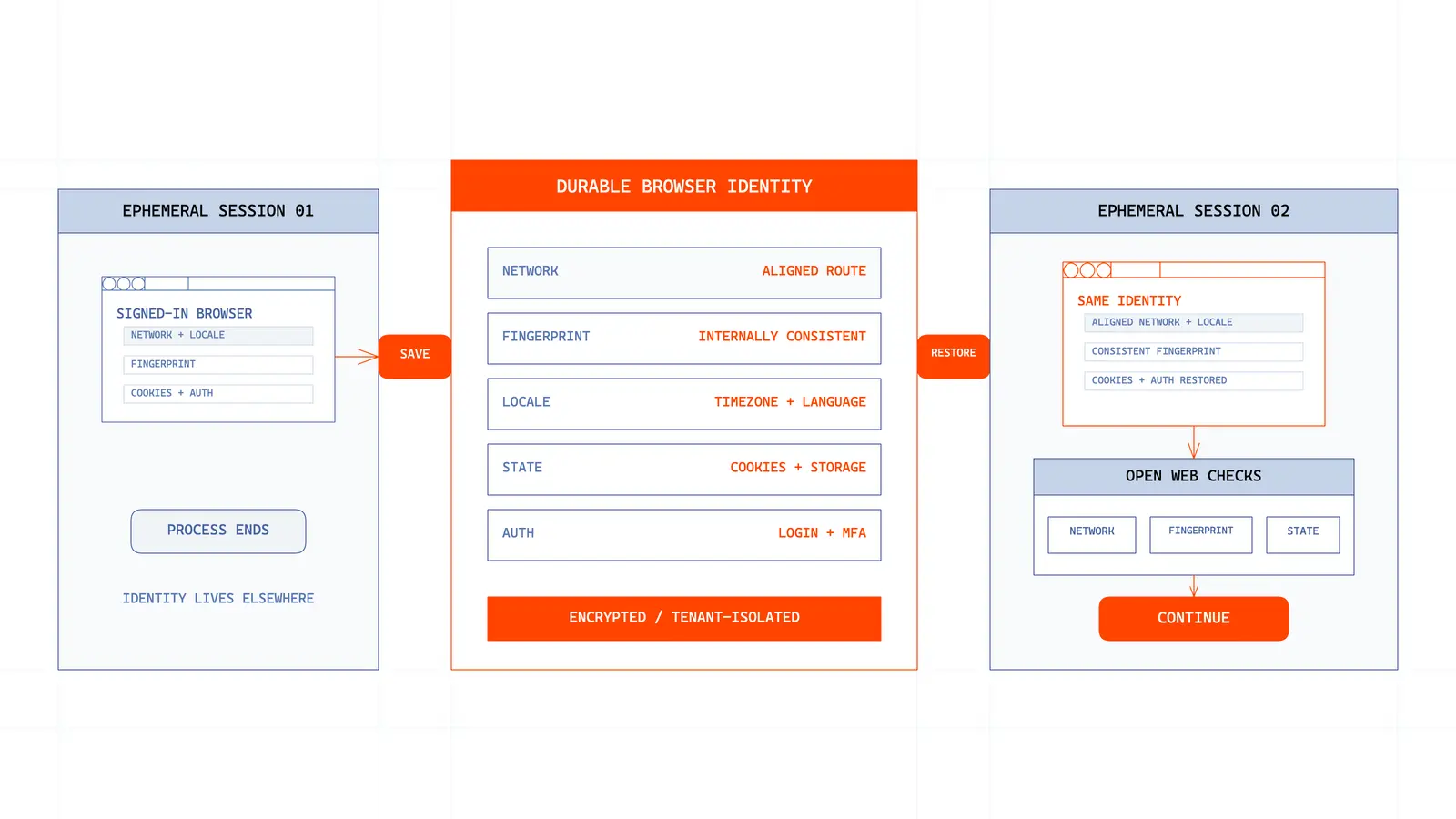
To complete tasks on your behalf, agents need access to all the software you have access to. This needs secure secrets management and login persistence, your long-running agents shouldn’t have to ask a user to sign-in to every site on every run. The runtime should separate ephemeral compute from browser state, encrypt that state, restore it into a clean session, and prevent one user’s cookies from reaching another.
Observability is an important part of the feedback loop
You’ve been running an agent for 1 hour and it fails at step 37 of 60. You look through dashboards for logs and traces, but all you’re left with is “target not found”
Was there a modal? Did the page redirect? Did an iframe load late? Did the site challenge the session? Did the browser crash before the click?
A production browser runtime needs 3 synchronized views:
- Live view: what the browser is rendering now, with a human takeover path.
- Session replay: what pixels or DOM state changed across the whole run.
- Structured traces: console, network, CDP, lifecycle, model, and tool events aligned on one timeline.
Something like this
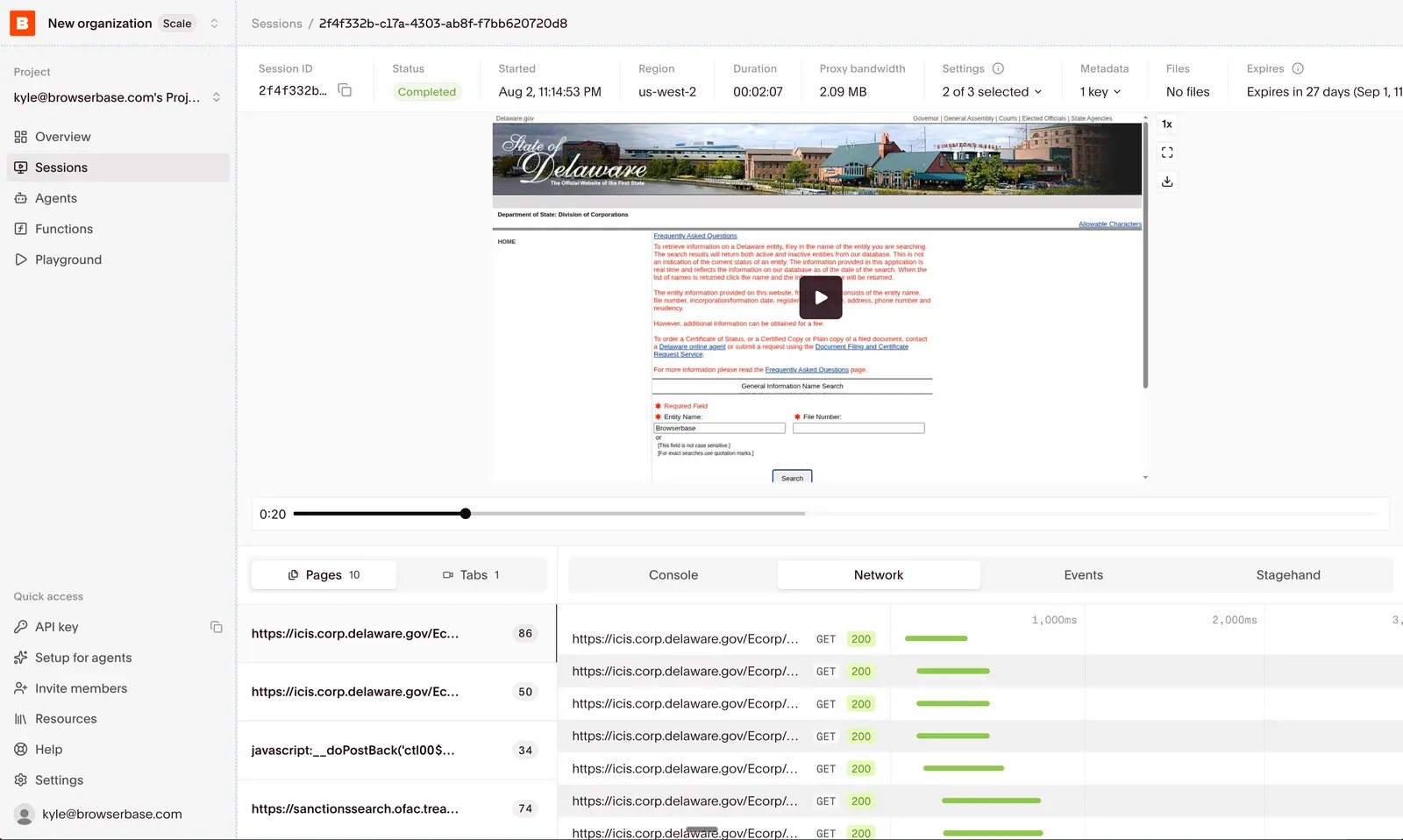
Adding this to Chromium inside a generic sandbox is possible, but adds to the scarce resource problem consuming CPU compute, storage, bandwidth, and engineering time.
If you build full video replay encoding, it competes with the browser itself for compute. If you try to use DOM reconstruction (rrweb) for replays, it’s cheaper but struggles with canvas, cross-origin iframes, shadow DOM, and other parts of the web you most want to inspect.
Your architecture should have 2 computers
A code sandbox + browser sandbox.
Each sandbox can scale on its own resource curve and have its own network policy. Browser state can persist without keeping the agent’s machine alive, and a compromised page reaches an isolated browser environment instead of the agent’s files and secrets. The agent reasons once, compiles the stable path, then executes that path beside the browser.
How should I build my agent then?
We believe the best version of this will look like one combined runtime: a filesystem, shell, model gateway, and browser available immediately in the same region. Underneath, the browser will still preserve its own microVM, lifecycle, identity, and observability pipeline.
Production agents will use both a code sandbox & browser sandbox together, and continually reduce the distance between them without collapsing their security boundaries.
Start building with Browserbase
Run headless browsers for your agents and automations at scale. Get started free in minutes.